Uptime MonitorStatus pages

When your customers ask what's going on, you have the answer

Uptime Monitor tells you the moment your site goes down. Your status page tells your customers. One link where they see what's affected and when it's back, while you get on with fixing it.

monitorstatus.eu/yourshop

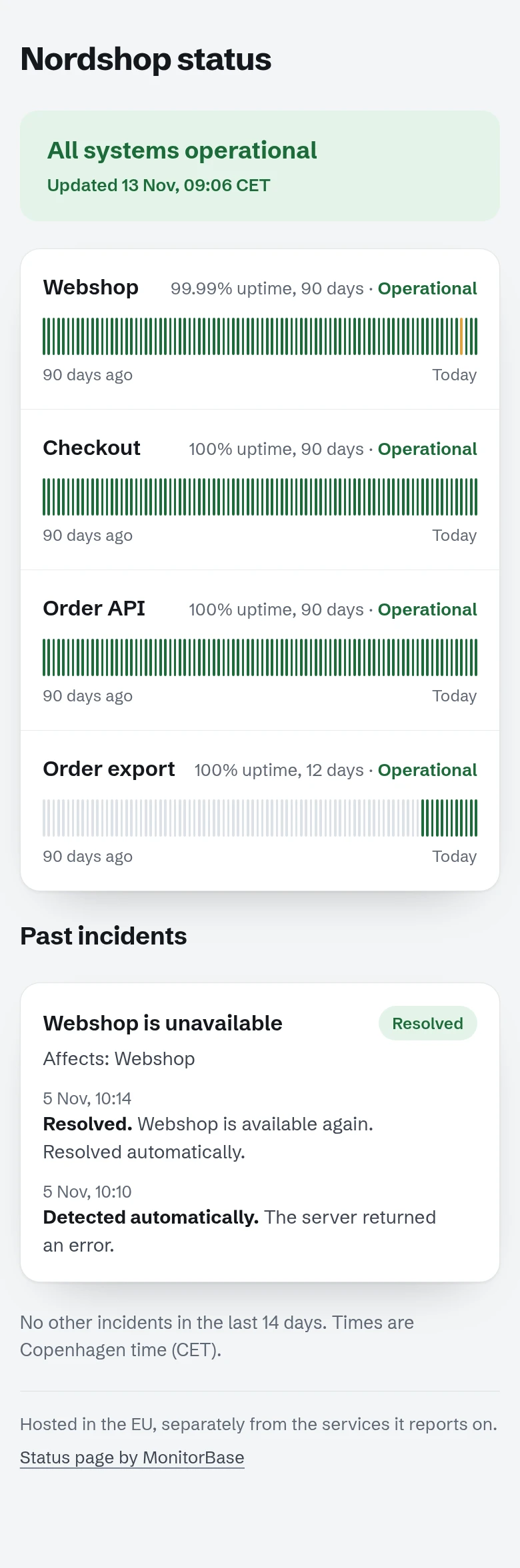
A public status page on a phone: Nordshop status, all systems operational, four services with 90 days of uptime each, and a resolved incident on the webshop.

Calm, clear answers while you fix it

An outage is stressful enough. A status page takes the questions off your plate, so your customers know what's happening and you can focus on the fix.

  • One link

    Everyone gets the same answer

    Send the link to whoever asks, put it in your e-mail signature and support replies. Customers see the current state the moment they open it.

  • Updates itself

    Your monitors keep it current

    Outages are detected automatically from your monitors and confirmed from Amsterdam before we alert you. The incident shows on the page, and closes when your site answers again.

  • Hosted separately

    Up when your site is down

    Status pages live on monitorstatus.eu, apart from the services they report on, so the page is there at the moment your customers need it.

One outage, two views

You see where it failed and who was told. Your customers see what's affected and when it's back.

Your view, in the appResolved

Server answers 503

Webshop · failed at HTTP response · 5 Nov, 10:10 · 4 min

  1. 10:10Paris: HTTP 503
  2. 10:10Confirmed from Amsterdam: outage confirmed
  3. 10:10Alert sent by e-mail and to Slack
  4. 10:10Status page: Webshop is unavailable
  5. 10:14Webshop answers again. Resolved automatically.

Example on Uptime Pro, for a fictional shop. Not a customer.

Your customers' view, at 10:11monitorstatus.eu/nordshop

Nordshop status

Webshop is unavailable Detected 10:10
WebshopUnavailable
CheckoutOperational
Order APIOperational
Detected automatically. Server returned an error. Affects: Webshop.

Drawn after the real status page above, with the same fictional data. At 10:14 the incident moves to "Past incidents" as resolved.

What's on your status page

  • Your services, by nameThe monitors your customers care about, under names they recognise: Webshop, Checkout, Booking.
  • The current state"All systems operational", or which service is unavailable right now.
  • Incidents and their resolutionWhen each outage was detected and when it was resolved, in Copenhagen time.
  • Uptime historyEach service's uptime over the last 90 days, so one bad morning sits next to the weeks that went well.
  • Its own addressmonitorstatus.eu/<name>, hosted apart from your site. Your own address (status.yourcompany.com) on Uptime Business: we set it up for you.
  • Confirmed outagesChecked from Paris, confirmed from Amsterdam before we alert you. The Amsterdam probe stores nothing.

Status pages on every plan

Uptime Pro is for a business with one or a few sites. Uptime Business is for many sites, or for clients. Monthly, cancel any time.

Status pages and monitoring per Uptime plan, EUR per month excluding VAT
Uptime Pro€12 /monthUptime Business€39 /monthPersonal€0
ForBusiness useBusiness use, many sites or clientsPersonal and hobby use only
Status pages3101
"MonitorBase" link on the pageNoNoYes
Your own addressNoYes, we set it up for youNo
Monitors50, heartbeats included250, heartbeats included5 + 1 heartbeat
ChecksEvery minuteEvery minuteEvery 5 minutes
Confirmed from AmsterdamYesYesYes
AlertsE-mail, Slack, Teams, webhooksE-mail, Slack, Teams, webhooksE-mail
Start Uptime ProChoose BusinessPersonal site, free
  • Uptime Pro €12 /month

    For business use

    Status pages
    3, without the link
    Monitors
    50, heartbeats included
    Checks
    Every minute
    Alerts
    E-mail, Slack, Teams, webhooks
    Start Uptime Pro
  • Uptime Business €39 /month

    For business use, many sites or clients

    Status pages
    10, without the link
    Monitors
    250, heartbeats included
    Checks
    Every minute
    Alerts
    E-mail, Slack, Teams, webhooks
    Choose Business
  • Personal €0

    Personal and hobby use only

    Status pages
    1, with the "MonitorBase" link
    Monitors
    5 + 1 heartbeat
    Checks
    Every 5 minutes
    Alerts
    E-mail
    Personal site, free

Every plan: outages confirmed from Amsterdam. EUR per month, excluding VAT. Monthly billing, cancel any time. Heartbeats on Pro and Business count within the monitor total.

For MSPs and web agenciesA status page per client: Uptime Business gives 10 status pages and 250 monitors for €39.

Questions about status pages

Status pages are a big part of where Uptime Monitor is going. Tell me what you'd want yours to do: christian@monitorbase.eu. An answer within 1–2 days.

Where does my status page live?

At monitorstatus.eu/<name>, hosted separately from the services it reports on, so it stays up when your site is down.

Do I have to update it during an outage?

The page follows your monitors: an outage confirmed from Amsterdam shows as an incident, and it's resolved automatically when the site answers again.

Can I have one per client?

Yes. Uptime Pro has 3 status pages, Uptime Business has 10, both without the MonitorBase link.

Can my status page use my own domain?

Your own address (status.yourcompany.com) on Uptime Business: we set it up for you. On the other plans it lives at monitorstatus.eu/<name>. Link to it from your site, your e-mail signature and your support replies.

Who is the free status page for?

For personal and hobby sites. It includes 1 status page with the MonitorBase link. A business uses Uptime Pro or Business.
Be the first to know, and the one with the answer

Uptime Pro, €12 a month: checks every minute, 3 status pages. Monthly, cancel any time.Personal or hobby site? Monitor it free.